SINC: Crew & Job Tracker
SINCBusiness
4.4436.00 Reviews
- Version
- 3.2.002
- Installs
- 100.00K
- Age Rating
- Teen
Screenshots
Our Review of SINC: Crew & Job Tracker
 Analysis by Appyee
I find SINC: Employee Time Clock most useful when a household business or small crew needs a shared view of shifts without relying on paper notes and memory. Picture a family-run cleaning service: one person organizes jobs, while relatives or other staff travel between locations and need a practical way to record their hours. The app is built for workplace timekeeping, not family scheduling, but that kind of everyday operation is where its focus can make sense.
One team, clear account boundaries
Shared use works best when everyone understands who is responsible for managing the account and who is simply recording work time. I would treat the person setting up employees and job sites as the organizer, then explain to each worker what they are expected to log. That simple division helps avoid confusion when more than one person uses the same device or helps manage the business.
I would not treat a shared phone as a substitute for individual accountability. If several workers take turns using one device to clock in, it becomes harder to know whose entry is whose unless the team has a clear routine. Before relying on that arrangement, agree on who handles each time entry and review records regularly. For a business with separate employees and shifting responsibilities, each person should follow the organization’s own process rather than casually sharing access.
Make the routine fit the shift
A useful way to introduce a time clock is to decide when it becomes part of the workday: for example, check the assigned job site, record the start of a shift, log a break, and clock out when the work is done. That sequence is more dependable than asking people to reconstruct hours later. It also gives a manager a consistent pattern to review when a shift crosses locations or includes a break.
For a small team, I would test the workflow with one ordinary day before making it the official habit. Check whether employees know which site to select, whether they remember to record breaks, and whether the person reviewing the entries can understand them. This is not busywork; a short trial can reveal unclear naming or handoff habits before those become payroll headaches.
The choice between a mobile time clock and a shared spreadsheet depends on how much structure the team needs. A spreadsheet is flexible and familiar, but people may enter hours late or use different formats. SINC’s emphasis on clocking in and out, job sites, and records is more appropriate when the business wants consistent entries tied to work locations. A full workforce platform may suit a larger operation with broader staffing needs, while a tiny team with stable hours may find a basic written log sufficient.
Location records need sensible expectations
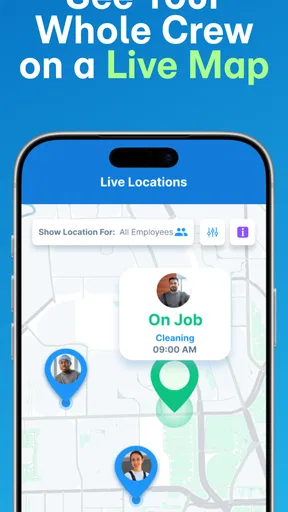
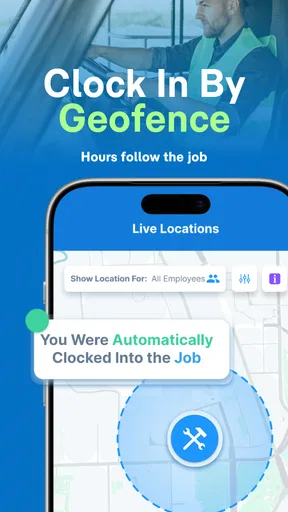
GPS tracking can help a manager check that an employee clocked in at the intended location, particularly when the team works at customer sites rather than one fixed workplace. I would explain why location matters and how the business uses those records before asking staff to rely on them. A location check can support coordination, but it should not replace a direct conversation about a missed entry or an unusual trip.
There is a trade-off here: location-linked clock-ins can make dispersed work easier to review, but they may feel intrusive if employees do not understand the purpose. Teams should set expectations clearly and use the feature in proportion to the work. For people whose jobs do not involve changing sites, the location-focused workflow may add little value compared with a simpler clock-in routine.
Who benefits, and who may want something simpler
The app is aimed at business timekeeping, and I would recommend it most to managers who need to coordinate hourly staff, shifts, and job locations without turning every shift into a paperwork exercise. It is less compelling for a household that only wants a shared calendar, a family chore list, or reminders for appointments. Those needs are different from recording employee attendance, and a calendar app would be a more natural fit.
It is also worth checking the commercial fit before building a routine around it. SINC is free to download, while in-app purchases range from $8.99 to $394.99 per item. I would look at the available purchase details against the number of people and the workflow the business actually needs, rather than assuming that every useful function will be included at no cost. The app has a Teen content rating, so it is not presented as a children’s household tool; its practical audience is a workplace team.
Coordination across a working day
Consider a small maintenance crew that starts at one site, takes a break, then moves to a customer’s property. The manager can organize workers around job sites, while each employee records the shift and break as the day unfolds. At the end, the manager has entries to review instead of relying entirely on texts or someone’s memory. If service drops at the second location, offline logging can help the worker continue recording time, with syncing once connectivity returns.
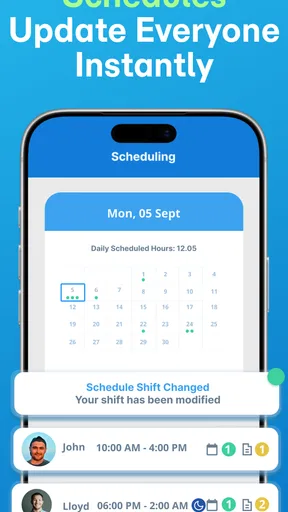
That workflow is especially helpful when a supervisor is not physically present at every job. Still, the app cannot settle every question about attendance by itself. A clock entry may show when someone recorded work, but managers still need a fair process for correcting mistakes, handling schedule changes, and confirming what happened when an entry looks unusual. I would make those rules clear before the first shift, not after a disagreement.
As a business app from SINC, it sits between informal manual tracking and broader workforce software. Its reported average is 4.4 from 958 ratings, and it has passed 100K installs. The current version is 3.1.023, with Android 7.0 as the minimum system requirement. Those details suggest an established mobile tool, but the best reason to choose it is still whether its location and timekeeping workflow matches the way a team actually works.
Let's dive into the world of SINC: Employee Time Clock, a nifty little app that can make managing employee schedules and tracking work hours a breeze. If you’ve ever found yourself drowning in a sea of paper timesheets or struggling with complicated software, this might be your lifesaver.
Getting Started with SINC
When I first opened SINC: Employee Time Clock, I was greeted with a clean and straightforward interface. It’s the kind of app that doesn’t overwhelm you with too many buttons or confusing menus. Setting up was a breeze, and I was up and running in no time.
One of the first things I noticed was how easy it is to add employees. You simply input their details, and they’re ready to start clocking in and out. No fuss, no muss. The app is designed to make your life easier, and it does just that with its intuitive setup.
Features That Stand Out
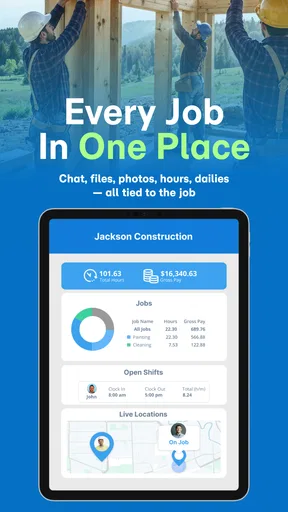
Now, let’s talk features. One of the standout functionalities of SINC is its GPS tracking. This feature ensures that employees are where they say they are when they clock in. It’s a great way for businesses to maintain transparency and trust. Plus, it’s super handy for field workers or teams spread across multiple locations.
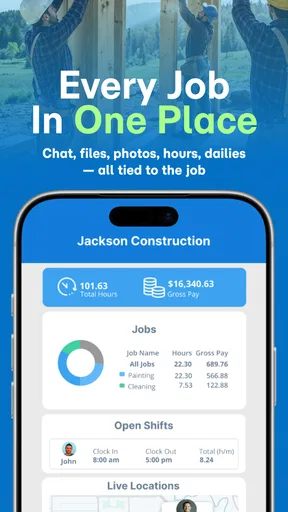
Another cool feature is the ability to create and manage job sites. You can assign employees to specific sites, track their hours, and even get detailed reports on each location. It’s like having a personal assistant managing your workforce logistics.
Easy Time Tracking
The core of SINC is, of course, its time tracking capabilities. Employees can clock in and out with a simple tap, and breaks can be logged effortlessly. The app keeps a detailed record, making it easy to review hours worked and ensure everyone gets paid accurately.
For those who worry about connectivity issues, fear not! SINC works offline, too. Employees can continue to log their hours without internet access, and the app will sync data once they’re back online. This feature is a lifesaver for teams working in remote areas.
Insightful Reporting
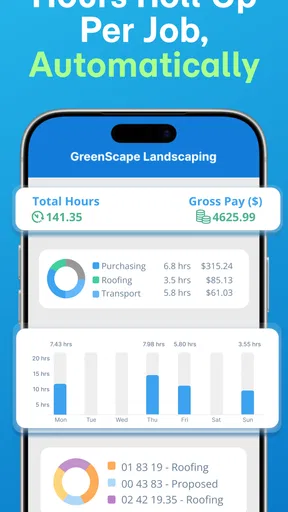
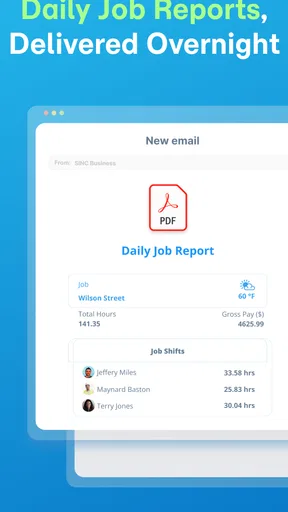
When it comes to reporting, SINC doesn’t disappoint. The app offers comprehensive reports that give you a clear overview of your workforce’s activity. From total hours worked to overtime tracking, it has all the data you need to make informed decisions.
The reports are customizable, allowing you to tweak them to suit your business needs. Whether you need a quick summary or a detailed analysis, SINC has got you covered.
User Experience
One of the things I appreciate most about SINC is its focus on user experience. The app is designed for ease of use, making it accessible to everyone, regardless of their tech-savviness. The interface is intuitive, and everything is where you’d expect it to be.
Even the less tech-inclined employees found it easy to navigate, which is a major plus. No one wants to waste time figuring out how to use a tool when they could be getting real work done.
Final Thoughts
In a world where time is money, SINC is a valuable asset for any business. It simplifies time tracking, enhances employee accountability, and provides insightful data to help you manage your team effectively. Plus, it’s all wrapped up in an easy-to-use package that won’t leave you scratching your head.
If you’re in the market for a reliable and user-friendly time tracking app, give SINC a try. It might just be the tool you’ve been looking for to streamline your operations and keep everything running smoothly.
Verdict
Strengths of SINC: Crew & Job Tracker
- User-friendly interface for quick setup.
- Real-time tracking improves productivity.
- Supports multiple time clock methods.
- Integrates with payroll systems smoothly.
- Customizable reporting features.
Limitations of SINC: Crew & Job Tracker
- Limited offline functionality.
- Subscription required for advanced features.
- Initial setup may be time-consuming.
- Mobile app lacks some desktop features.
- Occasional sync issues with servers.
Similar Picks in This Category
View All
LinkedIn: Community & Network
LinkedIn3.8

Zoom Workplace
zoom.com4.1

Microsoft Teams
Microsoft Corporation4.6

Meta Business Suite
Meta Platforms, Inc.4.6

Webex Meetings
Cisco Systems, Inc.4.5

TeamViewer Remote Control
TeamViewer4.4
Frequently Asked Questions
What is SINC: Employee Time Clock and how does it work?
SINC: Employee Time Clock is a comprehensive app designed to streamline employee time tracking and management. It allows businesses to efficiently record work hours, assign tasks, and manage payroll. The app offers a user-friendly interface, enabling employees to clock in and out seamlessly, with GPS verification to ensure accuracy. It's ideal for businesses seeking to enhance productivity and accountability.
Can SINC: Employee Time Clock integrate with other payroll systems?
Yes, SINC: Employee Time Clock offers integration capabilities with various payroll systems, making it easier to process employee salaries and wages. This feature ensures that all tracked hours are accurately reflected in the payroll system, reducing manual errors and saving time for HR departments. Check the app’s integration settings for specific compatible systems.
Is SINC: Employee Time Clock suitable for all types of businesses?
SINC: Employee Time Clock is versatile and can cater to businesses of different sizes and industries. Whether you manage a small team or a large workforce, the app provides customizable features that can be tailored to specific business needs. It is particularly beneficial for industries where employee time tracking is crucial, such as construction, retail, and hospitality.
What security measures does SINC: Employee Time Clock implement to protect data?
SINC: Employee Time Clock prioritizes data security by employing robust encryption protocols and secure login processes. All employee and company data is stored securely and is only accessible to authorized users. Regular updates and security audits ensure the app remains compliant with the latest data protection standards, providing peace of mind to business owners.
Is there a cost associated with using SINC: Employee Time Clock?
SINC: Employee Time Clock offers various pricing plans to accommodate different business needs. While there is a free version with basic functionalities, premium plans provide additional features such as advanced reporting, enhanced support, and integration options. It’s advisable to review the pricing details on their website to choose the plan that best fits your business requirements.
